Rooms and tables
This is where the software learns what your restaurant is actually like.
Why it matters so much
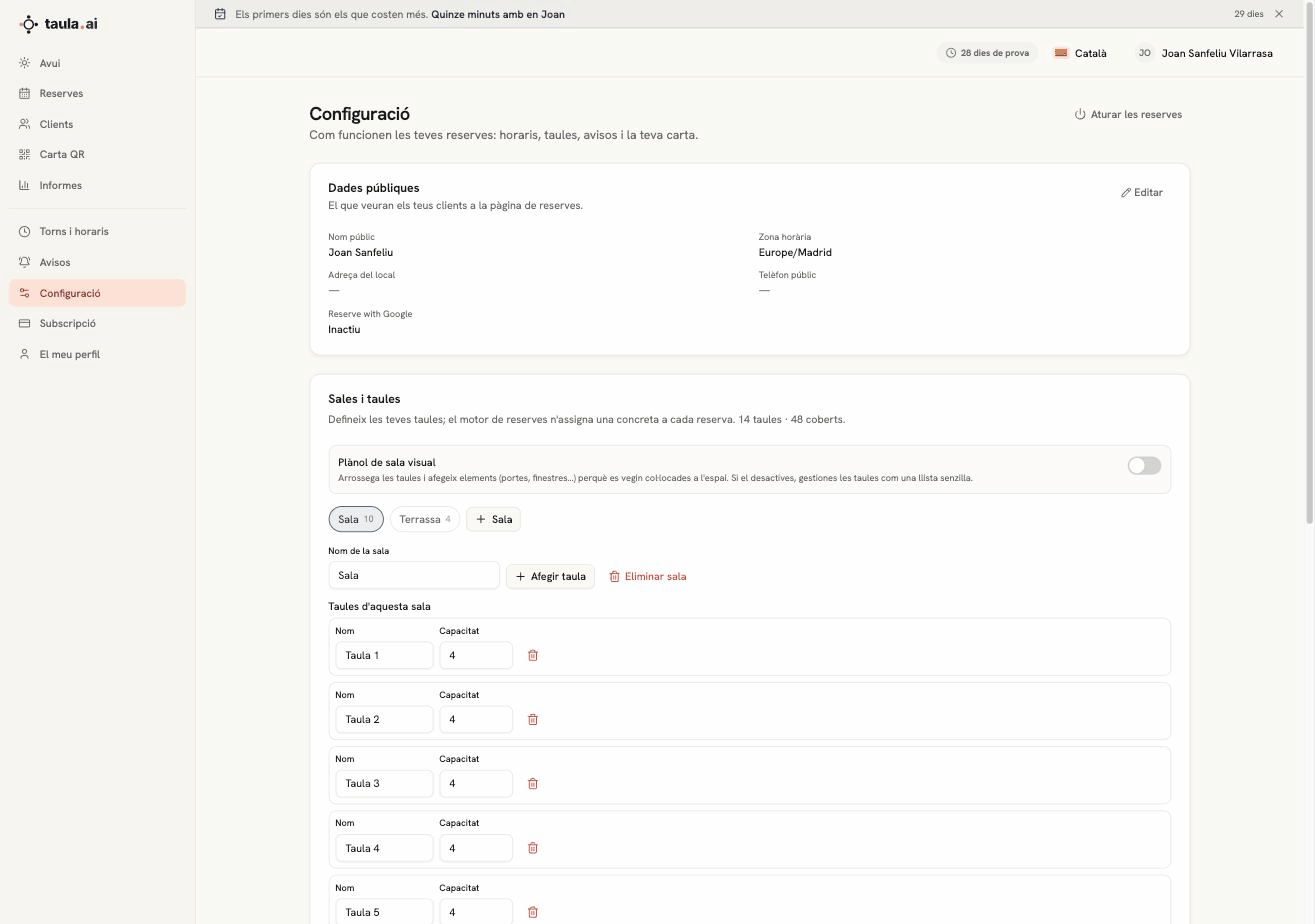
The availability a guest sees comes from here. If you say you have seven tables of four, the engine won't accept eight bookings for four at the same time. That's where the promise that you'll never get two bookings on the same table comes from.
Rooms
You can have more than one: Dining room, Terrace, Private. Each room has its own tables, and the guest can pick an area if you enable it.
Tables
Two things per table: name and capacity. The name is whatever you call it —"Table 7", "Window", "Bar 2"—; the capacity is how many people sit there.
The total is shown at the top: 14 tables · 48 covers.
The visual floor plan
There's a visual floor plan switch. Turn it on and you can drag tables around and add doors and windows so they sit where they really are, and the guest can choose where to sit.
Turn it off and you manage tables as a simple list. It's off by default, and for most restaurants that's the right call: the floor plan takes work to build and is only worth it if you genuinely want guests picking their table.
How a table gets assigned
The engine does it by itself when the booking comes in. It looks for the smallest table the party fits on —so a couple doesn't burn a table for six— and respects your area priorities if you've set any. If no table works, the time isn't offered.
You can always move a booking to another table from Today.