Subscription and invoices
taula.ai is a monthly or yearly subscription with three plans: Basic, Pro and Custom. Prices, always plus VAT, are at taula.ai/en/pricing. There's no commission per guest or per booking.
Everything on this page happens under Subscription, in the panel menu.
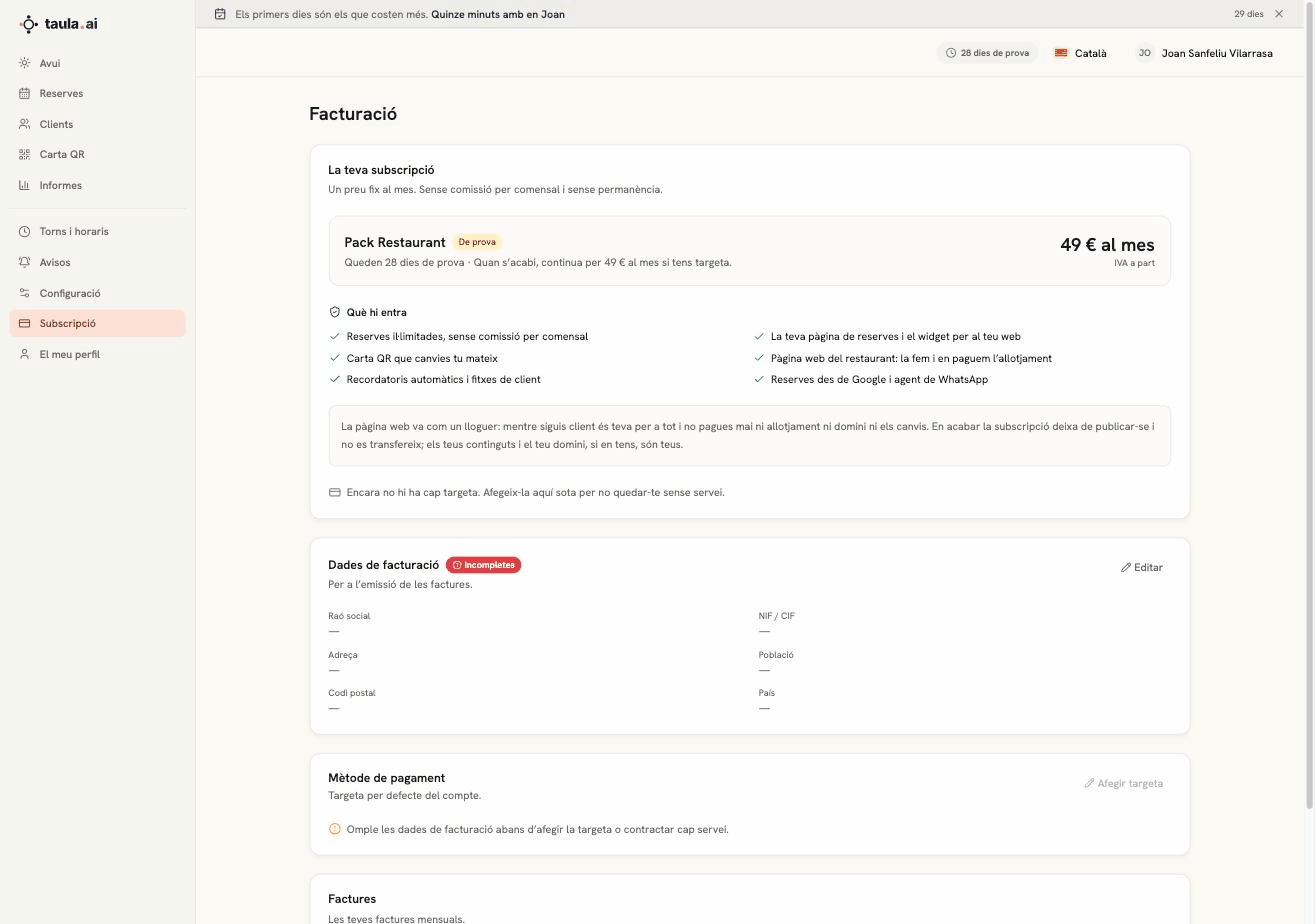
What's included
| Bookings | No per-guest commission; on Basic, up to 60 online bookings a month from November 2026 (how they're counted) |
| Your page | And the widget for your website |
| QR menu | Multilingual, you edit it |
| Your website | You build it in two minutes, we host it, and it rebuilds itself (who owns it) |
| Reminders | By email, and guest records. By WhatsApp, very soon: when the service becomes available, on Pro (50 a month) and Custom (200) (how it will work) |
| The booking link on your Google listing |
Subscription status
There's always a label on the card:
- Trial — you're in the free month; it says how many days are left
- Active — renews itself every month, or every year if you pay yearly
- Paused — your page isn't taking bookings; set up payment and it's back
Choosing your plan and setting up payment
When you set up payment, you choose two things:
- The plan: Basic or Pro. What each one includes is at taula.ai/en/pricing.
- How you pay: monthly or yearly. Yearly is paid in one go for the whole year; next to it you see what that works out to per month.
Prices are shown the way the invoice shows them: the base plus VAT, with the total in brackets. Then you move on to Stripe's secure page to add a card or set up direct debit.
If you do it during the free month with more than 48 hours left, nothing is charged while the trial lasts: the first charge comes on the day it ends. With less time left, or if your trial has no end date, the first charge is made the same day you set up payment.
If you're on Custom, there's nothing to choose: the price is the one we agreed and payment is set up the same way.
Changing plan
Once payment is set up, Subscription shows your plan and billing period, and the buttons to change them. Before anything is applied, the panel asks you to confirm.
| Button | When it applies | What you pay |
|---|---|---|
| Move to Pro | Straight away | The difference for the days left in the period, which goes on the next invoice. After that, the Pro price. |
| Move to Basic | At renewal, when the period you've already paid for ends | You stay on Pro until it applies; the Basic price from the renewal on. |
| Switch to yearly or Switch to monthly | At renewal, when the period you've already paid for ends | When it applies, the first period of the new billing option, minus the unused part of the old one. |
- A scheduled change is visible. Subscription says what will change and the date, which is the renewal date.
- It applies at renewal, up to a day and a half before that date, so the renewal doesn't charge you another period at the current price. From then on you're on the new plan.
- If you change your mind, press Cancel the scheduled change in Subscription, or write to hola@taula.ai, before it applies. Don't leave it to the last day.
- During the free month, as long as nothing has been charged, every change, including moving down and switching billing period, applies straight away and costs nothing. If you set up payment with less than 48 hours of the trial left, the first period has already been charged and changes work as the table says.
- On Basic you have the limit of 60 online bookings a month.
- Custom plan: there are no change buttons. If you want to change it, talk to us.
Paying yearly
- You pay for the whole year up front, in one go, and get one invoice for the year.
- It renews itself every year, at the yearly price.
- If you cancel, the service carries on until the paid year ends, but the unused part of the year is not refunded. That's what the Terms of Service say.
- To go back to monthly, press Switch to monthly: it applies at renewal, when the year ends.
The Basic plan's limit: 60 online bookings a month
The Basic plan includes up to 60 online bookings a month. Pro and Custom have no limit.
From when
The limit is counted from November 2026. Until then Basic has no limit: bookings from earlier months don't count and can't move you to another plan. That's what section 2 bis of the Terms of Service says.
How they're counted
- They count: bookings guests make on their own, through your booking page, the widget or the website, and the booking link on your Google listing. If you ever have an integration connected to your account that takes bookings on your behalf, the ones that come in through it count too.
- They never count: bookings you enter in the panel yourself, whether they came by phone, in person or any other way.
- They don't count either: bookings that get cancelled, that you decline or that you mark as a no-show (More → No-show).
- The count is per calendar month, in Spanish mainland time. A booking counts in the month it is made, not the day the guest comes to eat.
- The count is updated every morning.
Where you see it
Subscription shows the bar "X of 60 online bookings this month". Once you're past 80 %, or if the move to Pro is already scheduled, it also shows at the top of Bookings, next to Getting started.
What happens if you go over
- When you reach 80 % (48 of 60) we send you an email. Only once a month.
- If you go past 60, we write before the month ends to tell you that next month you move to Pro, with the price and the reason. Subscription will show "Next month you move to Pro".
- On the 1st of the following month, before making the change, we count the whole month again. If, leaving out cancelled and declined bookings and the no-shows you've marked by then, you're at 60 or fewer, you don't move to Pro and we tell you by email.
- Otherwise, the account moves to Pro that day, with the same billing period (monthly or yearly), and we let you know once it's done. The Pro price applies from your renewal: nothing extra is charged that day.
Guests never notice. No booking is ever refused or blocked because of the limit: your page keeps taking bookings, however many there are.
- During the free month the count runs and the move to Pro happens too, but nothing is charged until the trial ends.
- Mark no-shows on the day. Ones you mark after the count on the 1st no longer undo the change.
- If you go past 60 in the last hours of the month and we can no longer tell you before the 1st, you don't change plan that month.
- If you had a change scheduled for renewal (switching to monthly, for example), the move to Pro doesn't cancel it: it applies at renewal as you scheduled it.
- If the count doesn't look right to you, write to hola@taula.ai before the 1st. We review it (we can also do so ourselves) and, if we cancel the move to Pro, that month doesn't schedule it again.
- Once on Pro, you can return to Basic whenever you like from Subscription: it applies at renewal (how).
Billing details
Stripe's payment page asks for them (company name, tax number and address) when you set up payment, and you can change them later from "Manage subscription". They're the details that go on the invoice.
Payment method
Card or SEPA direct debit: you choose when you set up payment, on Stripe's secure page. Stripe holds the details, not us: taula.ai never sees the full number, only the last four digits. With direct debit, your bank pays the fee every month (or every year, if you pay yearly) and Stripe notifies you before each charge.
Invoices
One is issued with every charge —every month, or every year if you pay yearly— and you can download the PDF from this same screen.
Cancelling
There's no lock-in. Cancelling takes effect when the period you've already paid for ends: the month, or the year if you pay yearly. When you stop paying:
- Bookings, guests and the menu stay put; the account is paused, not deleted.
- The website stops being published and isn't transferred: it's a rental, not a purchase. Your copy, photos and menu are yours. What's yours and what isn't →